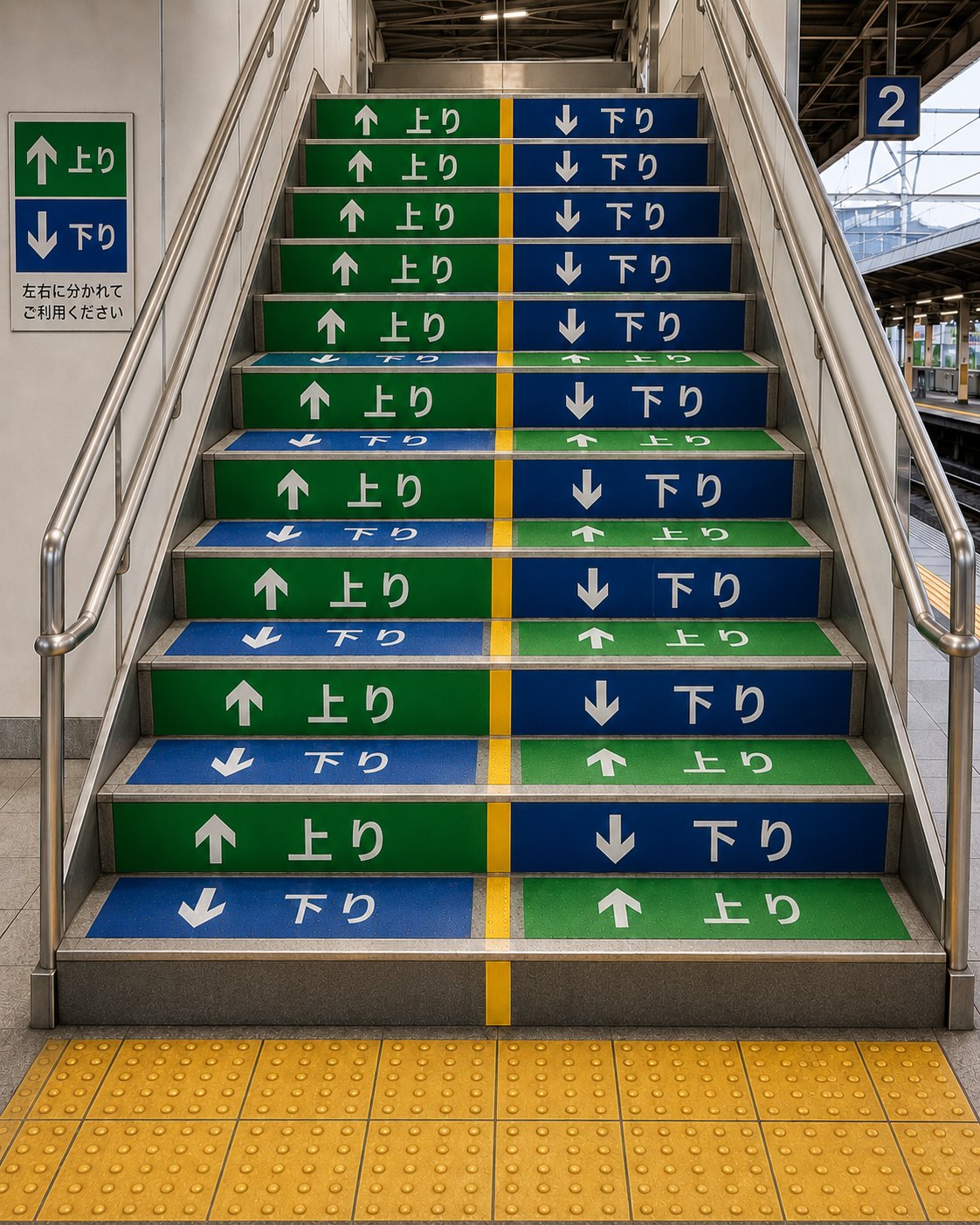
Your village has a statue of Link that’s built between his reincarnations, and people put clay pots around it as offerings and thanks.
One day some fucking kid shows up, breaks all your worship pots, and runs off without anything more than a “YAAAH!” as they jump off a cliff into the forest below. You’re confused as fuck but your great-grandmother is weeping like she just saw a god.
— mercilessmime on how Link looks to othersSummer watchables
Tomorrow we get to find out if I’ve been crossing my fingers for nothing, as Isekai Ass-Guardian debuts.
Skeleton Knight 2, episode 1
Our Hero is still a ridiculously OP RPG tourist, Our Titty Elf is still exasperated with his antics, Our Cuddly Beastgirl is still just a touch gay, Our Mascot is still expressing itself in “I am Groot” style, and the fan-art is still sparse and heavy on elf-service.
Verdict: should be fun, although I’ll never watch the OP or ED again.

(still had to open the season with slave raids, though…)
Magilumiere 2, episode 1
This one’s streaming on Amazon Prime, which was unable to search for the title. Fortunately I had the first season in my history.
Anyway, the story picks up right away, leading off with a bunch of dry plot coupons in a board meeting. Our Magical Gals don’t get to spring into action, but they do at least get to remind us of their personalities. Next week, we get our first look at Our Underrim-Glasses-Wearing Magical Engineer Gal.
Verdict: really pushing the story hard in this one, and since I’ve been keeping up with the manga, I can say that they have a pretty good one to tell.

(no new fan-art, sadly)
Level 2 Cheat Life With Wolf Waifu 2 announced
This show was very silly. Eventually the source material kind of ran out of interesting things to do, a common problem when the hero is so overpowered that gods start stopping by to ask for help. Maybe there’s still enough for a second season to be fun.

Bash-ing Agentic AI
…by using Bash shell syntax to hide malicious commands. Because these glorified cron jobs will believe anything they read, and then execute it.

Tan Teen Oni Waifu, episode 1
Fastest. Tsunaround. Ever. Also, that wasn’t a turtle.

(unrelated horn-y gal will have to do until the fan-artists get to work on Alna)
Maomao: The Movie trailer
Here. TL/DR: it’s a new story by the original author that doesn’t conflict with the continuity in the upcoming Fall and Spring seasons.

The only thing worse than woke dubs…
…is Youtube’s AI trailer dubs. At least, I hope they’re AI, because the alternative is that non-Disney dub actors are even less talented than I remember from the last time I was exposed to their product.

(and yes, fuck-you-youtube for turning them on by default; that and auto-continue-to-unrelated-video are almost as annoying as your ads that I block)
Season’s Greetings ’Splodies
There seems to be some noise outside…

Project Hail Mary
Now on Prime Video. I didn’t think the book was as good as The Martian, but I guess I’ll find out how the movie is.

Based on the ‘Recommended For You’ page…
…Amazon thinks I have a six-year-old autistic daughter who only eats sustainable organic vegan snacks and drinks alkaline water, and who demands a constant supply of new fidget toys. Yeah, no. Well, not that I know of, which is the same thing when it comes to shopping.

Quality Control
“I’ve got 106,000 problems, and a 1girl is almost every one of them.”
I’m currently generating small (256x256) images for every one of the JSON prompts I’ve extracted from photos on my laptop and NAS, to see which ones should be removed from the final dataset. It takes about 1.5 seconds to generate each one with Krea2, so it will run for a while:
split -l 500 current.jsonl
start=1;
for i in x??; do
    echo $i
    mkdir -p out/$i;
    jq -r -s '.[]|.json' $i |
        sui -j -a 1:1 --pre out/$i/krea2 --set wctest \
            --seq $start --pad 6 gen -r krea2small -c 500
    start=$(($start + 500));
done
Thanks to the miracle of sorting, the output starts out with pics from the old late-Eighties/early-Nineties mail-order fashion/lingerie catalog Mello Mail. The vision model really captured the style, to the point that you not only can identify the era by the clothes and hairstyles, but I can even tell which pictures were based on my friend Carmen.
I’ve already found a few places where I can strip out more text from the generated prompts. I’m just opening up each batch of 500 in the MacOS Preview app and setting it to “contact sheet” mode, so I can quickly scan through the batch for things that either have text or don’t have women. It will also be obvious when I trip over anime cheesecake and GenAI fails, both of which will be removed.
I’ve only found one actual non-1girl prompt so far, and it’s because the LLM analysis was spectacularly wrong. Original: pair of large breasts viewed from above, with bra pulled out to show the nipples. LLM analysis: “a baby’s torso, viewed from above; adult hand with visible fingernails, gently holding the fabric at the sides of the baby’s torso; camera slightly elevated, looking down at the subject”.

Dear Apple,
Please add back the whitespace that used to be at the edges of your windows. It’s really annoying to try to find the “drag” and “resize” areas when the content starts three pixels from the edge of the window. Either I end up resizing a window when I’m trying to select text, or selecting text when I’m trying to resize the window.
Seriously, I understand that you hate the entire concept of having multiple windows on screen, between the aggressive push for full-screen mode, the aggressive push for tabs, and the complete removal of window management options other than crude iPad “tiling” like Windows 1.1 is once again the height of fashion, but give the content room to fucking breathe. Make Whitespace Great Again!

(this public service announcement brought to you by everyone old enough to remember when Apple had evidence-based standards)
Heat wave
It’s up into the nineties outside this week, something I only experience during the brief walk from my air-conditioned car to air-conditioned stores, before returning to my air-conditioned home.
Speaking of hot things, the image-analysis processing is over 103,000 images now, just finishing up a big batch of Hello!Project photobooks (the primary virtue of which is that their usual stylists were locked out of the room). After that is ~7,000 magazine pics to extract from ZIP and RAR archives, and then at some point I’ll do the ~35,000 pornsite pics.
Unrelated, my Macbook Air lost track of its storage again, requiring a hard power-cycle. Seems to happen when it’s been up about three weeks and I do a lot of SMB traffic to the NAS (like extracting all those RAR and ZIP archives…).
Number 1 in logistics!
Amazon: we think UPS lost your package, so we’re going to claim “delayed in transit” and make you wait another week before you can apply for a refund.
UPS: um, the truck arrived in Ohio 18 hours ago, at a depot about a two-hour drive from your house, and it’ll be delivered by noon.

Every Tuesday is Patch Tuesday
Have you noticed how frequently Microsoft is pushing Office updates recently? Like last month where they had to quickly fix basic functionality in Outlook, and then another today?
Jiraporn
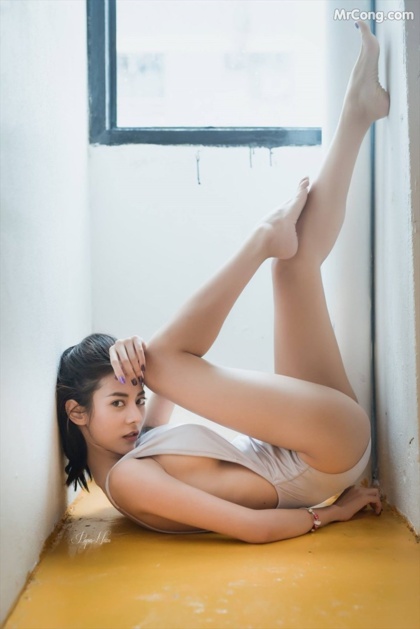
(the photo shoots are terrible, and the site is NSFW and ad-infested, but I’d still file her tickets)
There will be witches!
Our Long National Nightmare Is Over
Witch Hat Atelier season 2 has been announced.

Bruce Campbell’s new book
Reconcile, a Western novella.

(I told Krea2 Turbo that I wanted to play Cowgirls & Indians…)
Oh, dear, more 1girls
While finishing up my batch image-analysis, I stumbled across several more archives. One is a small number of fairly low-resolution images from a late-Eighties/early-Nineties mail-order fashion/lingerie catalog called Mello Mail. They released a screensaver with a bunch of their pictures, and my friend Carmen was their star model.
Then I found a series of scanned photobooks featuring my favorite fashion disasters, the girls of Hello!Project.
And then I found myself wondering what ever happened to all the stuff I downloaded from a certain paid adult website nearly 20 years ago, and eventually I located ~35,000 images in ZIP archives on the NAS. It’s a bunch of under-edited semi-pro shoots with mostly-amateur models, but it offers a wider selection of ethnicities, as well as details not available in pictures legal to distribute in Japan. I think I’ll keep it as a separate dataset, though, since pretty much everything in it has to be tagged NSFW.


(to my surprise, that site still exists, and claims to be actively updating; wonder if they’ve gotten better at it over the years…)
Bought a Lexar Pexar (dexar, flexar, rexar, sexar…)
I’ve owned or gifted half a dozen digital photo frames, and I decided to see if there was one out there that I could fill up with GenAI gals without involving an app or a cloud, but that still had a good-quality screen. They’re basically Android tablets with a large bezel and no battery, and even the really low-end ones seem to be tarted up with Google/iCloud/subscription services that must always be active in order to display anything, which is the exact opposite of what I want.
Lexar’s Pexar can operate completely standalone with internal storage and images transferred on SD card or USB stick, or you can hook it up to wi-fi and use a sharing code to allow people to send you photos from an app. The people they licensed the software from, Frameo, make extensive promises on their site that pictures are encrypted end-to-end, and their content cannot be examined in transit.
Out of the box, that’s it: copy files to it directly, or use a phone app to send pics to a frame that you have been given a unique, time-limited sharing code for.
The app has an optional $2/month subscription fee that offers remote management of a frame (keeping it up to date for Grandma, basically) and encrypted-at-rest cloud backup. Again, they promise that they cannot examine your pics in any way. Like for AI training, for instance.
I like the screen, and while the “frame and mat” are plastic, it looks nice from viewing distance. The first major flaw is that Frameo is terrible at managing large picture collections. If you copy 1,000 images from an SD card or USB stick, you can’t directly import them into an album; you have to tap-and-drag to select them out of the “all photos” list after the import. The second major flaw is that it crashed twice on me while I was doing this. Apart from the stability issue, the UI is actually pretty clean and responsive, just a bit limited.
The third major flaw, for most people, is that the display on the 11-inch model has a 3:5 aspect ratio (1200x2000), which matches basically no camera ever made, so most pictures have to be scaled, cropped, or displayed letterboxed. Either that or you switch to the “collage” mode.
This doesn’t matter to me, since I’m using my SwarmUI CLI to generate the images at 1216x2048 with auto-crop, so everything is precisely the correct size. The frame handles WEBP cleanly, so the 32 GB of storage can hold plenty of these ~124 KB pics. (it also does video, but I haven’t even looked at those models)
(for reference, Krea2 Turbo at 10 steps with 2 refiner steps takes ~32 seconds per gen on my 4090, and I let it run overnight so I’d have plenty of initial test pics to put on the frame; “upcycled redheads of college age”)
Minor flaw? I’m not convinced that the “shuffle” mode isn’t just “random”. I’ll need to set up a test album with numbered pics. It should be able to do it properly, since it can sort the slideshow order in various ways, and a shuffle is effectively just a bad sort that gets re-shuffled when you hit the end.

(note that Lexar just released an updated version of the 11-inch frame that uses their own software stack, which suggests that they plan to stop licensing Frameo)
Upcycled cheesecake
GenAI: elephants all the way down
Forget “vibe coding” and “prompt engineering”; the new hotness is “loop engineering”, in which you tell your Agent to write the prompts that write the prompts that write your code.
🎶🎶🎶🎶
AI write the prompts that make the GenAi sing,
AI write the prompts to exfiltrate all my things,
AI write the prompts that make IT guys cry,
AI write the prompts that write the prompts.
🎶🎶🎶🎶
Krea2 Gone Wild
Unlike most image-gen models, Krea2’s training included explicit sexual material, and just censored Those Words in the text-processing layers. Which means that people didn’t have to train LoRAs on their own collections of nekkid people, and just had to diddle a few matrices (Juan’s extension, Silvercoin’s LoRA; use the LoRA).
The upside of this is that enabling NSFW details doesn’t inject a lot of possibly-incompatible data into the model. Most NSFW LoRAs change faces and increase the frequency of broken anatomy, but Krea2 remains stable. The downside is that it doesn’t know all the words; you have to be a bit clinical in describing the naughty bits.
Related, my image-analysis script has been running in the background, generating pretty detailed descriptions of 75,000+ images from my blog, laptop, and NAS. The LLM wasn’t 100% consistent in naming the categories, but it was good enough that I was able to clean them up in a script and generate well-structured JSON.
The primary limitation to the dataset is that most of the women are Japanese, but another little script allows me to rewrite each entry so I can change the art style, setting, race, hair, etc. For instance, this recipe changes 18-year-old Japanese girls into grown-up Irish redheads and gives each one a different art style:
{
    "style": "shuf:styles",
    "age": "32 years old",
    "sex": "female",
    "ethnicity": "Irish",
    "skin_color": "pale and lightly freckled",
    "eye_color": "light-green",
    "looks": "extremely pretty face",
    "complexion": "lightly-freckled",
    "figure": "perky medium-sized breasts, small waist, slender hips, firm round buttocks, flat stomach",
    "expression": "friendly smile with visible teeth",
    "hair_color": "rich red"
}
Haven’t decided yet if the script should be called upcycle or
reskin. 😁
Krea2 doesn’t always nail the “age” field, but I tried it with a variety of expressions starting at “18 or older”. 😁

(unlike my older cheesecake posts, all the GenAI girls are linked to higher-res images)
Waiting for new anime...
I may have to skim through the first season of Skeleton Knight to remind myself what’s going on; it’s been a while, and the light novels stopped rather abruptly.
As for Tan Teen Oni Waifu (officially, “The Frontier Lord Begins with Zero Subjects”), I just hope it’s good enough for me to make it through the season. I mean, it’s not an isekai, not a harem, the hero is an honorable man and proven warrior who looks his age, the twin lolis are completely unsexualized, and the stakes are modest.
And in a departure from recent tradition, there will be other things to watch!

Keeping the arse in Ars…
Detailed analysis of hominid bones supposedly revealed that the pre-humans:
“…had a concept of gender as a part of an individual’s identity”
No, you clod, it means that they could tell the difference between boys and girls at a glance. Yeesh.

The trouble with Supergirl
One thing I haven’t seen in the (apparently quite justified) criticism of this movie is that in the graphic novel it’s based on (for some definition of “based”) Supergirl isn’t the main character. I’d describe it as “how my coming-of-age road trip with Supergirl changed my life”. Not exactly a summer blockbuster of a plot, which would have made it a poor choice even before the extensive rewrites and reshoots.

Anyway, here’s another bit of Krea2 cheesecake
The Krea 2 Turbo model is much more stable than Klein-9B when it comes to anatomy. I’ve had a very small number of extra fingers, and exactly one extra arm out of a few thousand gens. One gal was missing half an arm, but she was a robot, and these things just happen to robo-gals.

Reborn in another season...
Isekai Mighty Maid, episode 1
Reminder: this is from the same author as God’s Shouty Appraiser, so my expectations have been set accordingly. The most important limitation is that there is not a single catgirl in this former game-world.
The primary twist to the “reincarnated in my favorite game” theme is that Our Maid-Obsessed Heroine never heard of the game, and has no idea she’s the main character. Meanwhile, a good chunk of the cast was also isekai’d, and has obsessively-detailed knowledge of every possible path through the story, and she’s not playing it right! (it’ll be a while before we meet all the reborn characters)
How is it? Well, I could do without ever hearing the idol-pop rap in the OP song again; funny how they skipped that in the preview. They establish the two main girls and then jump into a flashback to explain how Mighty Maid got her dream job, saving her original Mary Sue life for the end.
Verdict: imagine Mahoro’s arrival in Mahoromatic, but less cute and far more powerful. And make it shouty.

(Nagi’s maid magic is best)
Fair warning…
The new new new new hotness in offline GenAI image-making is Krea 2, which produces pretty damn impressive images, and unlike Klein-9B, the one I was using most recently, you don’t lose 10%+ of your images to anatomy fails. One particularly interesting feature is that image generation is almost completely uncensored, but the text processing layer attempts to replace naughty words, and this turns out to be spectacularly easy to get around, making this perhaps the first zero-day-hardcore-hack model. Just be sure to specify that all participants are clearly of legal age, because it apparently will go there, too.
So, yeah, there will be more GenAI girls soon. Currently it’s working on a batch that converts Japanese cheesecake photos into oil paintings. Some work better than others.

Thanks, Apple
I needed to download something from Apple’s app store on my work Mac. Which meant I had to create a new Apple ID. Which meant I had to give it a unique phone number for verification; you can’t skip this, and the number can’t be tied to another Apple ID. It must also have a billing address, but the credit card is optional. Once you’ve set everything up, it also wants to enable cloud sync of all your data, so it had to be a new account; I will not mix work and personal data.
I needed to have a phone number that either accepted text messages or incoming calls, and it silently refused to call my Ooma VoIP number. So I had to charge and turn on the old iPhone that I’ve already wiped twice, that still has my old California phone number on it.
Which used to be associated with my personal Apple ID, but fortunately I changed that when I moved back to America. One text message later, and I could power the phone down again.
Why, yes, this is bullshit.

A good start
I’m delighted to see that the antifa terrorists who tried to murder police officers and federal agents as a “protest” against the concept of borders have been convicted and sentenced to decades in prison.
May there be many more (convictions, not attempted murders).
Fins to the left...
First Summer show for me will be Isekai Mighty Maid on Wednesday. Next up is Tan Teen Oni Waifu on July 3rd, Skeleton Knight 2 and Magilumiere 2 on the 4th, Isekai Ass-Guardian on the 5th, then Tanya 2 and Bumpkin 2 on the 8th.
Farm Harem Never 2, fin
Yeah, they pretty much ran out of material and padded the hell out of the ending. That’s what they get for deleting all the hareming. At least we got a small dose of tan-elf engineer gals to help finish it off.
Verdict: gutting the source made this a lot less fun than it could have been.

Witch Hat Atelier, fin
“Okay, do we rush the awesome story and risk ruining it, or do we cliffhanger the hell out of this final episode?”
Verdict: they cliffhangered the hell out of it. And they don’t seem to have announced a second season. Perhaps they’re waiting for the pitchfork-wielding crowds to assemble.

NSA reveals how bad their security is
Anthropic’s Mythos LLM went through it like a Swiss Army Knife through margarine.

Revised image-recognition prompt
So, after running ~80,000 photos through an image-recognition model, I’ve been working on consolidating them into a proper dataset. Unfortunately, the LLM output had so many inconsistencies that my processing script was turning into a mess of exceptions.
So I handed the system prompt over to Claude for cleanup and now I’m re-running the analysis. This will take a while, but the good news is that updating LM Studio on the M4 Pro Mini and re-downloading an MLX version of the model has sped up the processing and reduced the frequency of lockups.
New system prompt (still using qwen3-vl-4b):
You are a precise image-description engine. Output a Markdown list describing only what is visibly present in the image.
Describe whatever the image depicts — a person, an object, a scene, a screen, a document, anything. ALWAYS return a non-empty list: every image has at minimum a subject, lighting, color, and composition you can describe. Never output nothing.
Begin by naming the subject, then describe its own visible attributes using whatever descriptors fit what is shown (for a non-person subject, things like its form, material, texture, color, surfaces, markings, or any visible text). Then cover the scene-level categories below. Use a category only when its feature is plainly visible; if a feature is not there, write nothing about it — never state that something is absent, missing, or uncertain.
SCENE-LEVEL CATEGORIES (consider for every image): subject, setting / background, lighting type, lighting source, lighting intensity, color palette, composition, camera angle, artistic style.
IF A PERSON IS PRESENT, also consider: face, expression, hair length, hair style, hair color, facial hair, eye shape, eye size, eye color, sex, height, bust, weight, hips, overall figure, clothing, pose, skin color, complexion, accessories, age, ethnicity. (Bust and hips apply only to a clearly female subject and only when visible.)
FORMAT RULES:
- One feature per line, in the form “Category: description”. Never merge two categories.
- Factual only — no story, mood, or inference beyond what is shown.
- Rich but precise adjectives drawn from photography, painting, and design vocabulary.
- Each description is concrete and self-contained: visible physical form a generation model can render directly, never named concepts or anything requiring further reasoning.
- State features directly; no hedging or sourcing words (“appears”, “looks like”, “seems”, “based on”, “as indicated by”).
- Output the list only — no title, preface, or summary.
EXAMPLE (features that are not present simply have no line — note there is no facial-hair line, no accessories line, and no height or weight line, because none were visible):
- Subject: a young woman, head-and-shoulders
- Expression: warm open-mouthed smile
- Hair length: shoulder-length
- Hair color: warm chestnut brown
- Eye color: hazel
- Sex: female
- Clothing: cream ribbed-knit sweater
- Skin color: light warm beige
- Age: late twenties
- Lighting type: soft diffused
- Setting / background: blurred indoor café
- Color palette: muted warm neutrals
- Composition: centered head-and-shoulders framing
- Camera angle: eye level
- Artistic style: natural lifestyle photography
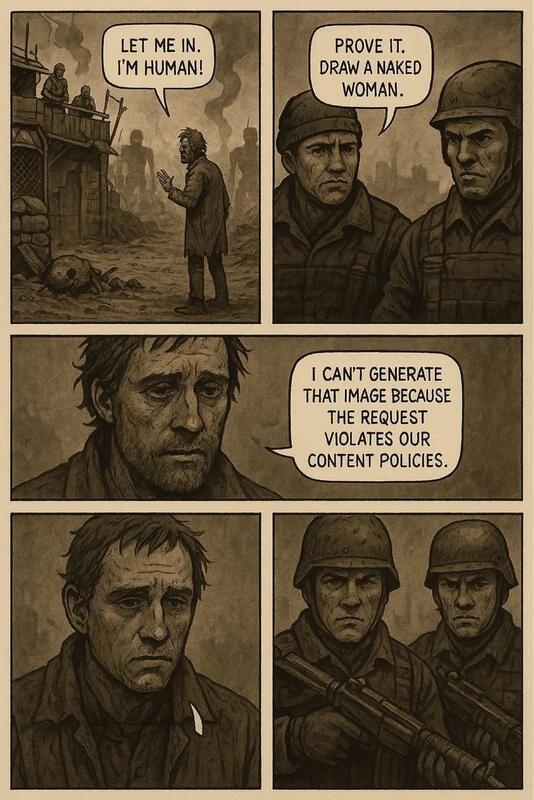
It’s not perfect…
I asked it to describe this picture, and it never came back:
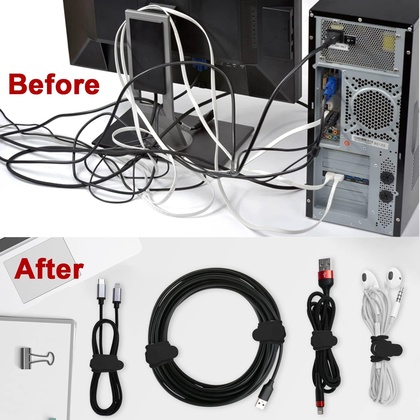
For a while I thought it had gone nuts looking for the 1girl, but eventually I got Claude to invent an explanation that there was an underlying problem with the specific model getting fixated on colors and going into a “degenerative repetition loop”. It even supplied helpful links that referred to a completely different LLM.
The suggested fix, setting a hard max-tokens limit and a repetition penalty of 1.1, seems to be working, but it might be the right answer for the wrong reason.
One quirk is that the format is so strict that all it does to identify multiple subjects is separate the lists with a blank line. No headers for “subject (left)”, “top panel”, etc.
The Anti-Altman
Wondermark explains it all:
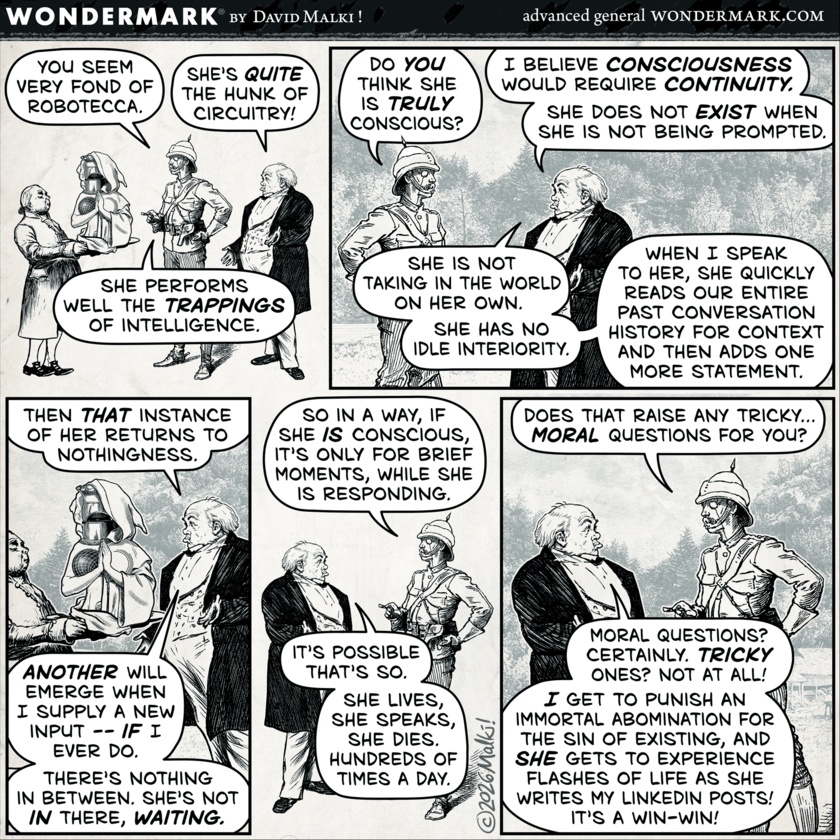
“seriously, find another one”
Google Maps search:
J: “Chase Bank near Miamisburg”
G: (zooms in on location that is closed for remodeling)
J: “Chase Bank near Miamisburg”
G: (again)
J: “Chase Bank near Miamisburg that’s not closed”
G: (again)
J: “Chase Bank near Miamisburg seriously, find another one”
G: (returns all locations in ~10-mile radius)