“Debbie Gibson and dog food. I’ve always dreamed of this.”
— Julie Brown, Just Say Julie!No highlights, please
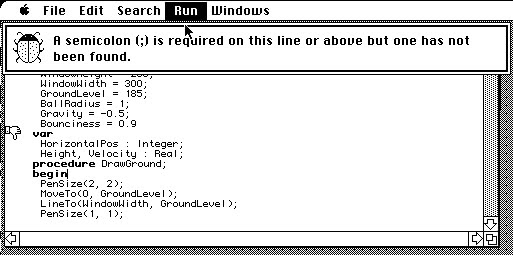
Why I Hate Syntax Highlighting: Mac Pascal.
(via)
Had to use this in a programming class back in the Eighties, and if the windows in the lab had been openable, I’d have defenestrated about three Macs a day.
"For the glory"
Wow, VMware wasn’t kidding about
Photon being a small, clean Linux
distro, although it would have been nice if they’d also left out
colorized ls output. Shame about systemd, but tdnf looks like a nice
cleanup of yum, even if my brain reads the name as to-die-in-fire.
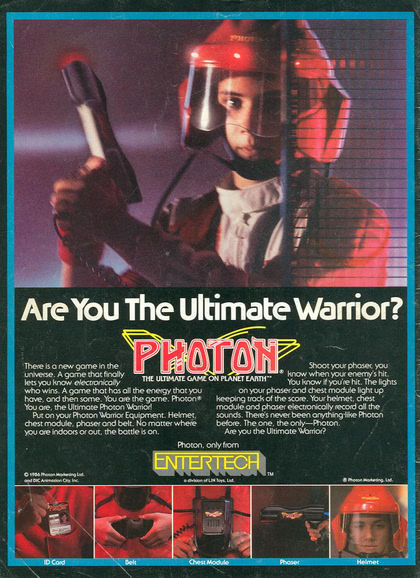
I barely even remember the ads for this, but I was in college at the time, and wouldn’t have spent my money on 15 pounds of laser-tag gear anyway. I did like the Peter David novelizations, though, which were better than you had any right to expect.
Update
Nearly one-eighth of the packages in the Photon repo are Perl
modules. That sounds about right. No, wait that was the Alpine
Linux window that I had open at the same time; Photon’s package list
is only about 2.5% Perl. Which is actually better, since mixing
packaged modules with CPAN downloads has always been a mess, and you
can never get everything you need from just the packaged stuff. You
should avoid the vendor-supplied scripting languages anyway, and use
perlbrew/rbenv/pyenv/etc to build clean ones.
Also, to my surprise, I found four of the six “David Peters” Photon novels on my shelves without much effort. They’re apparently rare as hen’s teeth now, with dealers listing them for ridiculous prices that make hundred-page books on Japanese pickles look affordable.
About the only Google service up right now...
…is Google+.
Probably because no one goes there any more.

togit:: and not togit, that is the answer!
With PDF::Cairo, I’ve formalized my dev/release process a bit. I have a handful of repos published on GitHub, because it’s the place people look, but I dislike Git. Bluntly, it exposes a lot of potentially destructive features by default, including the whole tissue-paper “branch” model. I’m of the rather firm belief that the most important task of a version control system is to preserve the history of your files, and Git doesn’t.
Git didn’t win the DVCS wars for any significant technical reason, it won because: the Linux kernel devs use it, team leads really like the GitHub pull-request model, and junior devs just out of college freeze when confronted with anything unfamiliar.
When I migrated all my little projects out of RCS, I chose Mercurial as their new home, and I don’t regret it. First, because the usage reflects design choices rather than implementation details; second, because most dangerous commands are disabled by default; third, because extending its functionality is quite simple even for people who dislike Python; and fourth, because it stores your revisions in append-only files with honest-to-gosh reversible transactions.
Even on a project where I’m the only user, I appreciate the fact that “cut-and-paste from StackOverflow” is unlikely to destroy my repo, something that is definitely not true for Git. On real projects at work, there are devs who will cheerfully follow any instructions they find online when they get in over their head, and not tell anyone else unless they can’t undo the resulting damage on their own.
For solo projects, I obviously don’t get into elaborate workflows, but I do like being able to push to a remote repo as an instant backup, so I have Kallithea running in a Docker container on my Synology NAS. Not visible from the Internet, of course, but I can always VPN back to the house, which also comes in handy when I’m out and about on an untrusted network.
With that out of the way, here’s my process for PDF::Cairo:
-
do all development locally in Mercurial (one branch, lots of little commits and extra test files I don’t plan to release).
-
snapshot the code and copy into the local Git repo, as a single changeset containing only files explicitly listed in the project
MANIFESTfile:
perl Makefile.PL
make dist
cp PDF*.tar.gz $GIT
cd $GIT
tar xzf PDF*.tar.gz
cd $GIT/PDF-Cairo
git add .
git commit
git push
- To keep track of exactly what changed, I have a Mercurial bookmark (which is more-or-less what Git calls a “branch”) named “togit”, which is applied to the last commit already pushed to GitHub. The following command gives the details of all of the changes since then, in chronological order:
hg log -r 'togit:: and not togit'
- Once the new version’s on GitHub, I move the bookmark to tip-of-tree and set it to not auto-update to new commits:
hg bookmark -i togit
The result is a clean public repo with a sensible history, backed by a messy private repo filled with random test scripts, todo lists, rude comments about poorly-documented APIs, etc. The distribution tarball can be uploaded to GitHub as a release, but someone who chooses to just download the automatically-created Zip/Tar archives will also get a complete usable release.
The only potential complication is accepting a pull request on Github
and then merging that back to Mercurial. For that, if it ever happens,
I’ll use git diff -r... followed by hg import --no-commit.
Sigh…
Submitted PDF::Cairo to CPAN, and PAUSE complained because it thought I was trying to take over ownership of the Cairo::ImageSurface and Cairo::RecordingSurface namespaces.
Because I added some convenience methods to them:
package Cairo::ImageSurface;
sub height {
        my $self = shift;
        $self->get_height;
}
sub width {
        my $self = shift;
        $self->get_width;
}

package Cairo::RecordingSurface;
sub height {
        my $self = shift;
        $self->{h};
}
sub width {
        my $self = shift;
        $self->{w};
}
Admittedly, this is a hack (and I can probably work around it by
explicitly naming them Cairo::RecordingSurface::height, etc, instead
of using package), but it strikes me as a rather aggressive behavior
by their uploader (“Index all the things!”).
I managed to give up “ownership” of Cairo::RecordingSurface, and I’ve re-uploaded a new version with the hack to the hack. Seems to work now.
Fun with automated testing…
One feature of CPAN is that there are a bunch of people around the world with automated testbeds that attempt to build each new module on a wide variety of Perls and operating systems. Within a few hours of uploading 1.03, I got email from one that failed on 100% of his test platforms.
In the vast majority of cases, it complained that there was no such
thing as a Cairo::RecordingSurface->create() method. Looking at the
source for the Cairo module, this can only happen if it’s linked
against a version of libcairo older than 1.10.0,
released in September 2010.
Yeah, I’m okay with that. I just noted it in the docs, and added that some future features will require 1.16.0 or newer (although all current functionality will continue to work).
Unfortunately, the failure reports don’t include the C library versions, so I’ll have to add that to the test suite to make it clear that it should fail if your libraries are that old.
A Certain Scientific Delivery Service...

Biden's new campaign slogan...
How else would you respond to accusations of inappropriate treatment of young girls?
