Chuck Martel: “One could learn a lot from the beaver. As ‘nature’s engineers’ they don’t bother attempting to build high-rise beaver lodges, instead constructing semi-subterranean homes that are sturdy, virtually impenetrable, and energy efficient, something current humans have yet to figure out.”
The Centrist: "I don’t wish to live underwater in a dark cave. It’s not good for my shiny pelt."
Alistair: "So in a Green Utopia we live in the dark and eat raw fish?"
— Beaver badgering in the comments on Marginal RevolutionAsobou!
I am compelled to make the following observations about the first novel in the Asobi ni iku yo! series.
-
The series title is given a wonderful Engrish translation as furigana: “Us It goes to play in Your house”.
-
The compound noun 食料合成機 (literally “food synthesis machine”) has the following pronunciation as furigana: ソイレント・グリーン.
For the kana-impaired, instead of shokuryou-gouseiki, it’s to be read as soirento gureen. Not having seen the anime (yet), I do not know if this joke was carried over.
Dear Google,
Auto-correcting my already-correct spelling of a search (even when I’m refining a search by adding additional keywords after already overriding your miscorrection) is annoying, but auto-correcting it to something that you have no search results for at all? STUPID.
The most reliable miscorrection I’ve found is the Japanese version of the LaTeX document processing system, which goes by the name “pLaTeX”. This is always corrected to “playtex”, even if the other words in the search are so specific that there are no Playtex associations possible, such as 傍点, the marginal dots that are used for emphasis in Japanese text.
Searches for LaTeX often include rubber gloves and fetish items, but the TeX community has been online for so long that they don’t dominate. In fact, I suspect horny rubber-lovers are often frustrated to find themselves receiving advice on pagination, hyphenation, and “how to make your font bigger”.
Dear Amazon,
Because I bought a Kindle, your recommendation system now fills the first several pages of results with random ebooks that either I already own in print, or else are not even plausibly related to anything I’ve ever purchased, owned, or searched for.
"Hey, you need to fill your Kindle with books! This is a book! It has a cover and a title page and words inside! You like words, right? Of course you do!"
Here’s one of the least stupid suggestions:
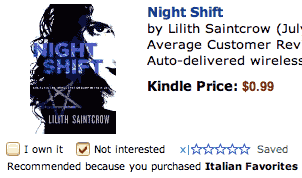
Because I bought Cooks Illustrated’s Italian Favorites, I really, really want to read about a monster-hunter who’s in over her head.
Other Kindle-fied “recommendations” include one called Blink, subtitled “The power of thinking without thinking”, because I own Beard on Food.
I can’t blame it all on the Kindle, though; that 750GB laptop drive I just bought led to a recommendation for a Gillette single-blade disposable razor. And there are some actual relevant recommendations, such as Shogun because I bought Exploring Kyoto, and James Beard’s New Fish Cookery because of the aforementioned Beard On Food.
And I really can’t complain about the DVD of Xanadu, recommended because my wishlist contains the Flash Gordon Blu-ray release. That’s just common sense.
Defense Against The Dog Arts

Unrelated: A shrine maiden, a buddhist nun, and a “catholic” nun walk into a bar, and…
No, wait, that’s not a bar, it’s a porn novel. My mistake.
Dear Microsoft,
I replaced my secondary hard drive over the weekend. Today I discover that Microsoft Office 2011 is demanding an activation key. Not “you need to go online to reactivate”, but rather “you can no longer use this product until you drive home, find the box, and re-enter the key”.
Permit me to describe my feelings about this.
I’ll keep it simple.
fuckyoufuckyoufuckyou
Microsoft Arc Touch Mouse
This thing. Travel version of the Arc Mouse. Replaces middle button/wheel with solid-state slide control that includes scroll, page up/down, and middle-click.
Except I lied there. It doesn’t actually support middle click. In his infinite wisdom, designer Young Kim made a click at the top of the strip, where your finger naturally falls, send a page-up keystroke. Clicking at the bottom of the strip sends a page-down.
Clicking the middle of the strip does nothing at all. You double-click the middle of the strip to generate a single middle-click. Middle-click-and-hold activates the annoying drag-scroll mode that I’ve never seen anyone use deliberately. Usually they end up trying to figure out why their mouse stopped working normally.
And why do I know the designer’s name? Because the only two things on the product support web site are an interview with him and a “lifestyle video”.
And why did I buy one? Because the last several MS mice I’ve bought had poorly-engineered scrollwheels that simply stopped working after a while, and I thought the solid-state version might be a step up. It looked nice at the company store, and didn’t suffer from the same heavy-spring problem that the right mouse button on the standard Arc has.
So, if you’re one of those two-buttons-is-enough Windows people, and you don’t mind risking the loss of the little USB dongle (held in place on the completely-flat underside of the mouse by a strong magnet), it looks like an excellent lifestyle accessory, and a decent mouse.
I am intrigued by her ideas...
…and wish to subscribe to her newsletter.

In addition to releasing indie singles as “Himawari”, Masae Ootani has been getting some decent theatre roles recently. This one looks like it makes good use of her distinctive style. Honestly, except for the sword, it’s like she just walked out of her apartment. Maybe she leaves it at home; Tokyo cops are so sensitive about that sort of thing.
Spoiling my laptop, and myself
A while back, I upgraded my laptop by replacing the DVD with a 240GB SSD. This has been very, very nice, and gave me just shy of 750GB of disk space, a third of it silly-fast.
So naturally I couldn’t resist replacing the 500GB Seagate hybrid with a Western Digital 750 GB 7200rpm drive, giving me just shy of a Terabyte. And I carry another Terabyte around in the form of a WD hardware-encrypted USB drive.
If this future we live in had flying cars and catgirls, it would be perfect.
Amusingly, despite the fact that this laptop (and its daily backups…) is the center of my electronic universe, I will likely not be taking it to Japan with me at the end of March. My sister and I are only going to be in Kyoto for a week, and time spent in the hotel is time wasted. I’ll take my little Win7 netbook (can VPN to work in an emergency) and my Kindle (v3 has kanji support, and 3G Whispernet works all over Japan), but the bulk of the weight in my carry-on will consist of cameras and lenses.
The Kindle is the reason for several of my seemingly-unrelated recent entries and sidebar links, by the way, including an upcoming discussion of my grand kit-bashing project that mixes Aozora Bunko, MeCab, JMdict, MongoDB, pLaTeX, dviasm, and pdftk, welded together with a few hundred lines of Perl to produce ebooks with personalized levels of furigana and matching per-page vocabulary lists. More on that soon.
In addition to Aozora’s out-of-copyright literature, it’s easy to find much more contemporary work marked up in their format. One should of course only download such things if one is already in legitimate possession of the printed book, but once that hurdle is cleared, my version will be much easier to work through. The scripts can take a complete light novel from raw text to completed PDFs in about 10 seconds, and it only takes a few passes to find all of the unusual vocabulary and definitions, so my reading speed will be improving quite a bit soon.
Which is good, because, as I said, I’m finally going back to Japan!
