“You’re thinking of majoring in history? What do you want to be, a ski instructor?”
— Poor life choices, reviewedThe New MacBook: not for me
When I first looked at one, I saw some reflections from the glossy screen, but it wasn’t obnoxious. Also, while I didn’t particularly like the keyboard (anything short of a Matias Tactile Pro simply can’t be good), it wasn’t worse than my current PowerBook, just different.
Today, the local Apple Store had them set out near the windows. Afternoon sun bouncing off of the buildings across the street gave me a more realistic test of the screen’s usability, and it failed. The reflections produced by diffused store lighting were easy to ignore; the image of the street outside was not. I see a big market in add-on glare hoods.
I wouldn’t have been in the market for one for a few more months anyway, but now I’m definitely waiting to see if they deal with the problem. Right now, I’m more likely to buy a Pro in September, just because of the screen. There’s not much size (or weight) difference between the MacBook and the 15-inch MacBook Pro, and the high-glare screen is still an option.
Also, the exterior of the matte black models were all smudged with fingerprints, visible from ten feet away, and they just put them on display…
PDF::API2, Preview.app, kanji fonts, and me
I’d love to know why this PDF file displays its text correctly in Acrobat Reader, but not in Preview.app (compare to this one, which does). Admittedly, the application generating it is including the entire font, not just the subset containing the characters used (which is why it’s so bloody huge), but it’s a perfectly reasonable thing to do in PDF. A bit rude to the bandwidth-impaired, perhaps, but nothing more.
While I’m on the subject of flaws in Preview.app, let me point out two more. One that first shipped with Tiger is the insistence on displaying and printing Aqua data-entry fields in PDF files containing Acrobat forms, even when no data has been entered. Compare and contrast with Acrobat, which only displays the field boundaries while that field has focus. Result? Any page element that overlaps a data-entry field is obscured, making it impossible to view or print the blank form. How bad could it be? This bad (I’ll have to make a screenshot for the non-Preview.app users…).
The other problem is something I didn’t know about until yesterday (warning: long digression ahead). I’ve known for some time that only certain kanji fonts will appear in Preview.app when I generate PDFs with PDF::API2 (specifically, Kozuka Mincho Pro and Ricoh Seikaisho), but for a while I was willing to work with that limitation. Yesterday, however, I broke down and bought a copy of the OpenType version of DynaFont’s Kyokasho, specifically to use it in my kanji writing practice. As I sort-of expected, it didn’t work.
[Why buy this font, which wasn’t cheap? Mincho is a Chinese style used in books, magazines, etc; it doesn’t show strokes the way you’d write them by hand. Kaisho is a woodblock style that shows strokes clearly, but they’re not always the same strokes. Kyoukasho is the official style used to teach kanji writing in primary-school textbooks in Japan. (I’d link to the nice page at sci.lang.japan FAQ that shows all of them at once, but it’s not there any more, and several of the new pages are just editing stubs; I’ll have to make a sample later)]
Anyway, what I discovered was that if you open the un-Preview-able PDF in the full version of Adobe Acrobat, save it as PostScript, and then let Preview.app convert it back to PDF, not only does it work (see?), the file size has gone from 4.2 megabytes to 25 kilobytes. And it only takes a few seconds to perform this pair of conversions.
Wouldn’t it be great to automate this task using something like AppleScript? Yes, it would. Unfortunately, Preview.app is not scriptable. Thanks, guys. Fortunately, Acrobat Distiller is scriptable and just as fast.
On the subject of “why I’m doing this in the first place,” I’ve decided that the only useful order to learn new kanji in is the order they’re used in the textbooks I’m stuck with for the next four quarters. The authors don’t seem to have any sensible reasons for the order they’ve chosen, but they average 37 new kanji per lesson, so at least they’re keeping track. Since no one else uses the same order, and the textbooks provide no support for actually learning kanji, I have to roll my own.
There are three Perl scripts involved, which I’ll clean up and post eventually: the first reads a bunch of vocabulary lists and figures out which kanji are new to each lesson, sorted by stroke count and dictionary order; the second prints out the practice PDF files; the third is for vocabulary flashcards, which I posted a while back. I’ve already gone through the first two lessons with the Kaisho font, but I’m switching to the Kyoukasho now that I’ve got it working.
Putting it all together, my study sessions look like this. For each new kanji, look it up in The Kanji Learner’s Dictionary to get the stroke order, readings, and meaning; trace the Kyoukasho sample several times while mumbling the readings; write it out 15 more times on standard grid paper; write out all the readings on the same grid paper, with on-yomi in katakana and kun-yomi in hiragana, so that I practice both. When I finish all the kanji in a lesson, I write out all of the vocabulary words as well as the lesson’s sample conversation. Lather, rinse, repeat.
My minimum goal is to catch up on everything we used in the previous two quarters (~300 kanji), and then keep up with each lesson as I go through them in class. My stretch goal is to get through all of the kanji in the textbooks by the end of the summer (~1000), giving me an irregular but reasonably large working set, and probably the clearest handwriting I’ve ever had. :-)
Gosh, I could have sworn that one was taken...
I’m a bit surprised that FHM’s streaming video feature, Webtv, hasn’t gotten them in trouble with the folks at WebTV. Sure, they stopped calling the product that well before I left, but the trademarks are still out there, scattering little motes of mindshare.
To the best of my knowledge, there are still several hundred thousand people in the US with WebTV-branded boxes attached to their television sets, vigorously navigating through email, ebay, chat, and porn.
番号は五です
Prologue
Sometimes I love this job, he thought, drinking in the sight of the full moon hanging in front of him, eclipsing the stars. He reached out with a gloved hand. So close I can almost touch it…
“Grab that ass and you’re a dead man, Guri.”
文化の娘
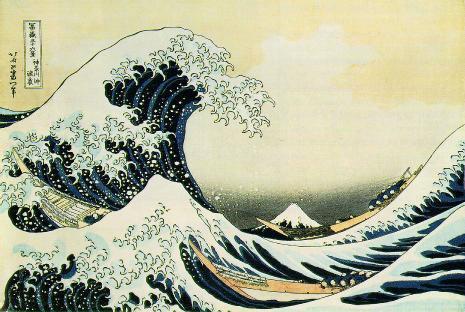
A common complaint among older generations is that the youth of today has no respect for culture and history. I’m pleased to see that this is not an issue in Japan.
You've been a sysadmin too long when...
…while walking to the restroom in search of relief, you:
- spot a printer with a paper jam,
- fix the jam,
- wait to see if it's fixed,
- clear the second jam,
- diagnose the problem,
- solve the problem,
- reload the paper tray,
- verify that it's printing correctly.
Then you resume your trip to the restroom.
I, I, I!
Later, I’ll be making a major revision of my translation of the Dirty Pair theme song Russian Roulette, but there’s something I want to get in writing before I forget it.
When I started going through the lyrics, I felt very strongly that the omitted pronouns should be “I”. Discussing it last night with my teacher, we disagreed on a few of them, but I still believed that I was right.
While working out this morning, I realized why: the singer is speaking for Kei and Yuri; she’s a woman pursuing a man romantically, but the life she leads forces her to describe the chase in terms of a secret agent hunting an enemy. Everything in the song is about her; her life, her risk, her heart, expressed to him the only way she knows how.
He’s the listener, addressed directly – “anata” – but never the subject.
Dear Rubbermaid,
In future, when you advertise a beverage container as having a half-gallon capacity, would you be so kind as to test it with precisely one half gallon of liquid? This would prevent sudden demonstrations of the hydraulic power of iced tea.
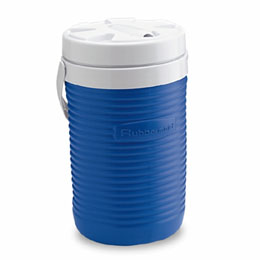
Update: PS: please design a spout that doesn’t leak as much as it pours after a few days of light usage.
