In Katy schools, throwing food, carrying a pager and having a skateboard are all listed in the student code of conduct as offenses that can warrant calling in the police.
— Zero tolerance strikes againThe problem with "Letterman's rape joke"...
…is that he never made one. In all the outraged coverage of the incident, you think someone would have bothered to mention that little nugget of information.
I watched the clip everyone’s linking to. He made a joke that implied that a player for the Yankees (who is good-looking, quite successful, and has been caught fooling around in the past) left the field in the middle of the game and had sex with Sarah Palin’s daughter. The exact words were “her daughter was knocked up by Alex Rodriguez”. Not a single word about rape, and, in fact, one could easily reverse the outrage by pointing out that these people are insisting that sex between a light-skinned female and a dark-skinned male must be rape.
Letterman and his writers obviously thought they were talking about Palin’s adult daughter, an unwed mother who was knocked up by an athlete. They’re guilty of being too lazy to check which daughter attended the game, or perhaps of not even knowing that there was another daughter. But that’s all.
If you happened to know (as Letterman and his equally-clueless writers obviously did not) that the daughter at the game was 14 years old, you could interpret it as a statutory rape joke, but I haven’t seen anyone say that. Unless something’s been edited out of the clip (and I got it from a site that was feeling the rage), there’s just no rape in this “rape joke”.
Dear Apple,
Why does Mail.app keep segfaulting in this method call:
[MetadataManager getAllCalendarStoreData]
I’ve turned off data detectors, rebuilt my iCal database, rebuilt my Mail indexes, and pretty much everything else I can think of, and it still crashes anywhere between 2 minutes and one hour after I start it up.
Mind you, I have no idea why your email client is importing all of my calendars in the first place…
[Update: various forum posts suggest that this is tied to Leopard’s merger of iCal to-do list functionality into Mail, which works by syncing your local to-do lists up with your IMAP server. Except that I don’t use iCal for to-do lists, and wouldn’t want them on my mail servers if I did. So, a feature I’ve never used that does something I don’t want has inexplicably started causing my email to crash at random intervals, and since the bug has been around since at least 10.5.2, it’s unlikely to be fixed deliberately. One can only hope that there’s enough mail-related cleanup in Snow Leopard that it starts working there…]
Riddle me this...
So, in a story about a well-placed State Department official on trial for spending the last 30 years spying for Cuba, what sort of direct quote do they lead off with?
"We were all appalled by the Bush years"
Because, y’know, that puts everything in perspective. If proven guilty, what we have here is someone who turned traitor because he started hating America during the Carter administration, but somehow, it’s still all about Bush. Fits the established narrative better, y’see.
Whatever happened to Stone Clouds?
Every once in a while, I’d visit the old Radioactive Panda site and see if there was any word on Eric Johnson’s next comic. The answer was always no (in the form of deafening silence, unless you visited the forums), but he has now returned with an official update, revaling a new start date and the reason for his three-year absence: respectively, “August 2009” and “World of Warcraft”.
Yeah, I can see that.
Engrish Pop Quiz
I saw something at Daiso a while back that I thought would make an amusing gift for my sister. On the back was found this label:
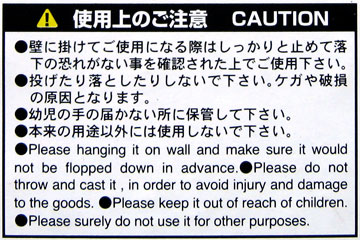
Now, what’s the product?
Das Limpet
When we got down to my house after seeing Spamalot, Nellie wanted to see Holy Grail. As I dug through the DVDs piled on my shelves, she was alternately amused and surprised by the contents of my collection, until I reached the one that turned out to be right above Holy Grail. I showed it to her, and got the reaction I expected: IT MUST BE MINE! (for a brief loan, at least).
When I told the story to Dave at lunch today, his blank stare reminded me how crucial a few years can be when it comes to pop culture. It had simply never occurred to me that someone in my usual circle of friends would never have heard of this:
Thighs, Ponzu, Spam, Steak, and BiscuitPeachGingerCrack
My sister’s in town for business, so…
No, wait, let me start again.
My lovelytalentedarticulatestylisheducatedsensiblesuccessful sister’s in town for business, and arranged to come in early so we could spend Saturday together in San Francisco, and Sunday down at my house.
Friday, while working from home, I prepared for her visit by lighting up the smoker and preparing a double batch of spicy smoked chicken thighs. I think she’d have disowned me if I’d shown up at the airport without them.
Saturday, I picked her up at SFO and handed over the chicken, then we bummed around Japantown and Chinatown for a few hours (praising the heavens that our mother was not along to see the everything-must-go final-auction-starts-at-noon Chinese antique shop), sat impatiently in the bar for several hours while the hotel prepared our rooms, and then headed out for dinner and Spamalot. Since both hotel and theater were in the theater district (which should be renamed the theater&bum district), all we needed was a good place to eat, and a Zvents search turned up Ponzu, an asian fusion place that has some delicious food. Whatever else you get there, order the kalbi beef and the fried chickpeas, and eat them together. Trust us on this one; we ordered a second helping of the beef to use up the leftover chickpeas.
After that, it was off to Spamalot, which Ticketmaster shamelessly lied about the cast of, but the touring cast was by no means a disappointment. It’s a terrific show, very Python but hip, and I wouldn’t be surprised if it came back to SF for a longer run in the future.
Inexplicably, the rows in front of and behind us emptied out completely at intermission, and we heard one of the groups complaining about John O’Hurley’s inauthentic British accent. In Spamalot. Monthy Python. Farce. They just couldn’t get past it. Either they were season-ticket-holding Serious Theatre Patrons™, or they inhaled a bit too much of the pot smoke that was drifting in from the nearby exit door, and were just friggin’ high.
Sunday morning, it was off to my house, which, for a change, was quite clean in the rooms that weren’t sealed off. More chicken was consumed, and for dinner, giant juicy Costco steaks, coated with rub and tastefully incinerated on my nuclear grill at a safe and comfortable 725°. Served with cheesy toasts and wine, life was good. Also surprisingly grownup-like, with candles and music and a centerpiece and both of our laptops shoved firmly to the side. Not at all like my usual combination of a frozen dinner and a web browser.
Dessert was the fresh peaches she brought from Chicago, sliced, sugared, and milked, on freshly-baked canned biscuits, topped with crushed Shouga Tsumami (aka “Ginger Pinch”, aka “Ginger Crack”, aka “Ohmygodthesearegoodgivememore”).
