“Creation science” has not entered the curriculum for a reason so simple and so basic that we often forget to mention it: because it is false, and because good teachers understand exactly why it is false. What could be more destructive of that most fragile yet most precious commodity in our entire intellectual heritage—good teaching—than a bill forcing honorable teachers to sully their sacred trust by granting equal treatment to a doctrine not only known to be false, but calculated to undermine any general understanding of science as an enterprise?
— Stephen Jay Gould, in The Skeptical Inquirer, Vol. 12, page 186Fuggin’ around
This recent entry explains why Playboy wanted Deborah Gibson naked. Not just because she’s got a great body, but because she shouldn’t be allowed to dress herself.
I think it must be a new kind of camouflage; she’s dressed to hide behind the Sixties.
Yeah, what he said
I love the Internet. Whenever someone writes about how a certain group of people behave, inevitably commenters will prove his point by example. Either they’re not reading past the first paragraph, or they’re so self-absorbed that they simply can’t recognize themselves in his words.
The third possibility is that they’re just drive-by commenters who don’t even bother to read the words of someone who disagrees with them, and just regurgitate reflexively.
Four cores, no waiting
My dual-dual-core PowerMac arrived this week. I had to go with the “low-end” graphics card, because there’s a 6-8 week delay on the better one (I simply refused to consider the best one, which would have added $1,650 to the price), but performance is quite spiffy, and the machine is quite quiet in normal operation.
How quiet? I can occasionally hear a bit of drive noise when it’s chugging away, but I’ve yet to be able to pick the fans out from the background noise in my house. I’m sure that will change when I really start pounding on the CPUs, but when it’s idle, I forget that it’s turned on.
Sadly, since I’ve come down with the seasonal muck, it’s all I can do to sit up long enough to play World of Warcraft for a few hours. The good news is that I can crank up all the video options and still get 30 frames/sec on my 20” Cinema Display. Well, except in front of the bank in Ironforge, but that problem’s on the other end.
Configuration details:
- 2.5GHz Quad-core PowerPC G5
- 4GB DDR533 Non-ECC 4X1GB
- 250GB Serial ATA-7200rpm
- 16x SuperDrive Dual Layer (DVD-R/CD-RW)
- NVIDIA GeForce 6600 256MB SDRAM
- AirPort Extreme + Bluetooth
The machine it’s replacing is a dual 1GHz G4 (WindTunnel aka “Dual Mirrored Doors”), so some performance improvement is to be expected. :-)
Thank you, University of Kansas
I’m delighted to see Intelligent Design being given the serious attention it deserves:
A course being offered next semester by the university religious studies department is titled "Special Topics in Religion: Intelligent Design, Creationism and other Religious Mythologies."
A new low in gaming lawsuits
I’m sorry, but this is bullshit so raw that even a Democratic presidential hopeful wouldn’t touch it:
The parents filed a suit against Blizzard Entertainment on Wednesday, saying their son jumped to his death while reenacting a scene from the game, the report said.
What scene would that be? The one where you deliberately send your character off the edge of a cliff, knowing that he’ll die when he hits the ground? Or did he leave a note saying that he was going to teleport to the top of the Twin Colossals and try out that cool new Parachute Cloak he picked up at the Auction House in Gadgetzan? Or did these loving parents just not pay enough attention to their kid to notice that he was suicidally depressed?
If this cash-grab fails, no doubt they’ll turn up a witness who claims that the kid was shouting “Accio Firebolt!” on the way down, and sue J.K. Rowling next.
Automating
Most of the real bang for the buck with OS X Tiger is under the hood, but as cool as things like Core Image are, Apple found it easier to focus their marketing on three key features: Dashboard, Spotlight, and Automator. The only problem with this is that they’re not done yet.
Spotlight should have been released as an open beta for users to play with and developers to write plug-ins for. Instead, Apple made it pretty much the only way to search in Tiger, and hijacked a very useful keyboard shortcut to activate it. Worse, the indexing process is a major pig, and the default behavior is to index the entire contents of any disk you attach to your computer, as soon as you connect it.
Dashboard is a cool prototype of a number of ideas. If they ever finish the APIs necessary to write full-featured programs in DHTML, a thousand useful special-purpose tools will appear. As it is, all we’ve got are a thousand web-scrapers, search buttons, and picture viewers, and many of them are CPU hogs. To be honest, I’m more excited by the tantalizing glimpse it gives of a future desktop-layering API; the way that the Dock, Exposé, and Dashboard exist outside the desktop while interacting with it has real potential. I think we’re going to see more such layers in future releases; the most obvious candidates are screen savers and the grab-bag of tools with “float above over windows” options, but there are certainly others I haven’t considered. My other hunch is that a mature version of Dashboard would be a perfect match for an Apple PDA; the SDK’s emphasis on small size and distinctive front graphics fits almost too well.
Which brings me to Automator. It’s actually good enough to call a released application; the problem is that it isn’t what Steve told us it would be. In another year, perhaps, third-party developers will have fleshed it out with a wealth of plug-ins that make it possible to really tie your applications together in useful ways without programming, but it’s not there yet.
So. Today’s problem: my manager’s SO has 3,680 audio files that she wants to put on her iPod. Unfortunately, they’re in a format iTunes doesn’t understand. Google turned up a few Windows utilities that claim to grok this format, but the only Mac tool likely to work was a Mac OS 9 app, and I really didn’t want to reinstall Classic just to find out.
To my surprise and delight, however, QuickTime Player reads them just fine, and it has an Export function that will let me write them out in AIFF or WAV format. In theory, this is a perfect task for Automator: “for each file in these directories, open it up and write it back out in WAV format, then send the whole lot to iTunes and have it convert them to MP3/AAC”. In practice, however, the only thing that Automator can do is allow you to select the files and send them to QuickTime Player; converting them requires a bit of AppleScript programming. Automator will run that script once you’ve written it, but unless you get lucky and find something on the web that’s pretty close, it may take longer to automate the solution than to do it by hand.
I got lucky. Even better, I happen to have another 8,400 of these files that I wouldn’t mind having on my iPod…
[update: it turned out to be easier to hack the script to walk the directory tree directly, so I don’t need Automator at all, just AppleScript. The only way to improve the script further would be to write it in Perl and generate the necessary AppleScript; that way I could have a decent string-handling library.]
Dear OSM™,
I tried to find out what your reason for existing is, but I’m afraid I didn’t make it past the “From the founders” letter. Quoting:
At OSMTM (Open Source Media), we believe that to be true—that freedom, openness and transparency in media is an inevitable result of the technological advances that have given every citizen the chance to breathe deeply of the news, thought and opinion that hovers in the ether between us.
-
Note that HTML has a perfectly good mechanism for encoding a trademark symbol, ™. Using guarantees that cut-and-paste will transform your name into OSMTM.
-
“A, B, and C are”, not “A, B, and C is”.
-
“every citizen” has been given this chance? Really?
-
For that matter, “every citizen” has? Citizen of what, precisely?
-
“…breathe deeply of the news, thought and opinion…”?!? Sounds like you’re trying to attract ads for bongs and hookahs.
-
“…hovers in the ether between us”?!? Never mind, I see you already have enough bongs of your own. Did someone actually read this nonsense before posting it?
And where faceless, "objective" editorial boards once handed down opinions and endorsements, bloggers sound off, the numbers on their public sitemeters lending them unassailable credibility as voices for the rest of us.
I was going to point and laugh at the absurdity and awkward phrasing of the part I highlighted, but I simply can’t get over the juxtaposition of that line of bullshit with the scare quotes you put around the word “objective” in describing the sort of media companies you say you’re different from. “Editorial boards are just something to sneer at, but hit-counters are The Rock of Gibraltar, baby!”.
OSM’s mission is to expand the influence of weblogs by finding and promoting the best of them, providing bloggers with a forum to meet and share resources, and the chance to join a for-profit network that will give them additional leverage to pursue knowledge wherever they may find it.
I’m sorry, but this sentence simply doesn’t parse right. Is it “expand the influence by ‘finding and promoting weblogs’, ‘providing bloggers with a forum’, and ‘the chance to join a network’”, or is it “expand the influence by ‘finding and promoting weblogs’ and ‘providing bloggers with a forum and the chance to join a network’”?
[Mind you, I’m not at all sure how your network is supposed to give someone leverage (additional, no less) to pursue knowledge, much less ‘wherever they may find it’, but I’ll let that one go for now.]
From academics, professionals and decorated experts, to ordinary citizens sitting around the house opining in their pajamas, our community of bloggers are among the most widely read and influential citizen journalists out there, and our roster will be expanding daily.
Apparently your community of bloggers is missing some key knowledge about the difference between singular and plural nouns. Also, when one is addicted to lengthy sentences, mastery of the serial comma is essential for clarity.
[And who decorates experts, anyway?]
...but the next phase in the democratization of ideas has begun.
Only a phase, is it? Nothing to get excited about, then.
Flashcards revisited
A while back, I made quick and dirty hiragana flashcards, using the Mac OS X print dialog to print single-word pages 16-up. As my Japanese class moves along, though, there’s a need for something more sophisticated. Each lesson in our book includes a number of kanji words that will be on the test, and while my previous method will work, the hard-coded font sizes and word placement get messy to maintain.
If I’m going to write an honest-to-gosh flashcard generator, though, I might as well go whole-hog and make it capable of printing study words vertically, the way they’d be printed in a book or newspaper. Learning to recognize horizontal text might get me through the test, but it’s not enough for real Japanese literacy.
Here’s the Perl script (requires PDF::API2::Lite), a horizontal example, and vertical example. You’ll need to supply the name of your own TrueType/OpenType font that includes the kanji, unless you happen to have a copy of Kozuka Mincho Pro Regular around the house.
Note that the above PDF files have been significantly reduced in size (by an order of magnitude!) by using Mac OS X’s Preview app and saving them with the Quartz filter “Reduce File Size”. The words in the sample are from the review sheet for this week’s lesson…
Update: One problem with my vertical-printing solution quickly became obvious, and I don’t have a good solution for it. The short version is “Unicode is meaning, not appearance”, so variant glyphs can’t be easily selected, even if they’re present in your font. Specifically, the katakana prolonged-sound mark 「ー」 should be a vertical line when you’re writing vertically. Also, all of the small kana 「ぁぃぅぇぉっ」 should be offset up and to the right, and good fonts include correct variants, but I can cheat on that one; I just need to move the glyph, not change its shape.
No one seems to have figured out the necessary font-encoding tricks to pull this off with PDF::API2. At least, it’s not turning up in any google incantation I try, which leaves me with one conceptually disgusting workaround: rotate and flip. Calligraphers and type-weenies will cringe, but at text sizes it will pass. The correct character is on the left:
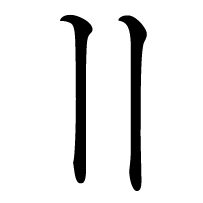
Now to write the code for both workarounds…
[side note: Adobe’s premier software suite is remarkably fragile; I just got it into a state where I couldn’t run Photoshop. How? I started Illustrator, which opened Adobe’s software-update tool in the background, then quit Illustrator. When I started Photoshop, it tried to open the update tool again, couldn’t, and crashed.]
