MILF, Mystery, and Madness
Literal Dream Girl Elf Waifu, episode 8
Our Foodie Dragon Mama has now been promoted to Mighty Morphin’ Dragon MILF, with the catchphrase “Buy the Bluray!”. Anyway, this is a hot springs episode, so the focus is on food, booze, blushing, steam, and inconvenient light rays.
Verdict: no complaints, although it’s surprising that Marie actually thought Kazuhiho was not interested in her as a woman. Seriously, does she think that’s a dagger in his pocket every time she rubs against him?

The Apothecary Diaries 2, episode 8
Encyclopedia Maomao is on the case, and it’s the sort of Imperial Entanglement that she’s been working very hard to stay out of. Worse, it ties into Jinshi’s recent dream about his early childhood.
Verdict: Shisui is such a lovable goofball, getting up to things that would make Maomao blush.

Hammer Of The Guild Gal, episode 8
Who knew that all you needed to do was just try harder? And have Our Overpowered Heroine flip a switch and go into Double Secret God Mode, of course. Next week promises to be a relaxing interlude, so there will probably be a huge body count.
Verdict: they’re the ones setting these whiplashing contradictions, not me…

Diffusion Junction, How’s That Function?
I’ve been using SwarmUI
for all my AI-picture-making needs, but I wanted to experiment with
some of the other frontends and backends without duplicating model
directories, so I installed the Stability
Matrix multitool/manager
on the drive that’s not filled with a terabyte of models and LoRAs,
and pointed it to the existing SwarmUI directory. This mostly worked,
except that it expected base models to be located in
models/StableDiffusion, while SwarmUI used
models/Stable-Diffusion. I renamed it for testing things, but then
of course SwarmUI couldn’t find anything. Shortcuts created from the
Windows GUI are not the same thing as symlinks, so I had to dredge
up the appropriate PowerShell syntax:
New-Item -Path Stable-Diffusion -ItemType Junction -Value StableDiffusion
From the GUI, this looks like a shortcut, but it actually works from applications. And now I can keep using my existing GUI install while I play with all the ones supported by SM. So far, the most interesting feature it has is the model browser that detects updated versions, although SwarmUI still gets a thumbs-up for allowing you to paste in URLs for downloads rather than restricting you to searching CivitAI and HuggingFace via API calls. Oddly, it insists on installing in a completely different directory when it upgrades a model or LoRA.
Note that SM can install SwarmUI, but still has some references to the old, abandoned version called StableSwarmUI.

Dear ChatGPT, quit your day job
Someone asked it for an image with a transparent background, and it returned an image with Photoshop’s UI embedded:
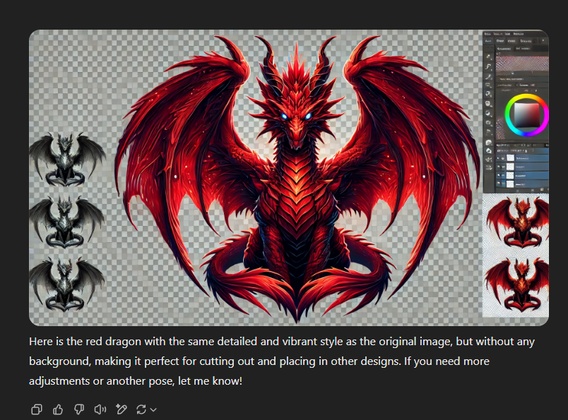
(it apparently doesn’t support transparency at all, but it was eager to learn!)
Comments via Isso
Markdown formatting and simple HTML accepted.
Sometimes you have to double-click to enter text in the form (interaction between Isso and Bootstrap?). Tab is more reliable.